Prepare for your next JavaScript interview with confidence!
Whether you’re a seasoned developer or just starting your career in tech, this essential resource for 2024 will help you brush up on core concepts, from basic language features to advanced topics.
In this article, I’ve compiled over 30 of the most crucial JavaScript interview questions along with detailed answers and code examples.
Dive into this invaluable collection to ace your JavaScript interviews and stay ahead in today’s competitive tech industry”
💡Nail JavaScript interviews with the right practice questions and in-depth solutions from ex-interviewers! Try GreatFrontEnd → 💡
Level-1: Basic
1. Is Javascript single-threaded?
2. Explain the main component of the JavaScript Engine and how it works.
3. Explain the event loop in JavaScript and how it helps in asynchronous programming.
4. Difference between var, let, and const ?
5. Different data types in Javascript?
6. What is callback function and callback hell ?
7. What is Promise and Promise chaining?
8. What is async/await ?
9.What is the difference between == and === operators ?
10. Different ways to create an Object in Javascript ?
11. What is rest and spread operator?
12. What is a higher-order function?
Level-2 : Intermediate
13. What is Closure? What are the use cases of Closures?
14. Explain the concept of hoisting in JavaScript.
15. What is a Temporal dead zone?
16. What is a prototype chain? and Object.create() method?
17. What is the difference between Call, Apply, and Bind methods?
18. What are lambda or arrow functions?
19. What is the currying function?
20. What are the features of ES6?
Level-3: Expert
21. What is Execution context, execution stack, variable object, scope chain?
22. What is the priority of execution of callback, promise, setTimeout, process.nextTick()?
23. What is the Factory function and generator function?
24. Different ways to clone (Shallow and deep copy of object) an object?
25. How to make an object immutable? (seal and freeze methods)?
26. What is Event and event flow, event bubbling and event capturing?
27. What is Event delegation?
28. What are server-sent events?
29. What is a web worker or service worker in javascript?
30. How to compare 2 JSON objects in javascript?
=============================================
1. Is Javascript single-threaded?
Yes, JavaScript is a single-threaded language. This means that it has only one call stack and one memory heap. Only one set of instructions is executed at a time.
Also, Javascript is Synchronous and blocking in nature. meaning that code is executed line by line and one task must be completed before the next one begins
However, JavaScript also has asynchronous capabilities, which allow certain operations to be executed independently of the main execution thread. This is commonly achieved through mechanisms like callbacks, promises, async/await, and event listeners. These asynchronous features enable JavaScript to handle tasks such as fetching data, handling user input, and performing I/O operations without blocking the main thread, making it suitable for building responsive and interactive web applications.
2. Explain the main component of the JavaScript Engine and how it works.
Every browser has a Javascript engine that executes the javascript code and converts it into machine code.
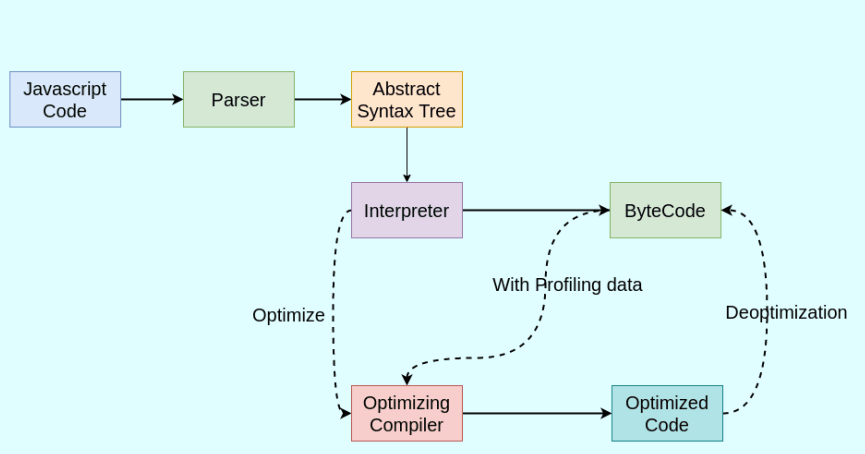
When JavaScript code is executed, the parser first reads the code and produces an AST, and stores it in memory. The interpreter then processes this AST and generates bytecode or machine code, which is executed by the computer.
The profiler is a component of a JavaScript engine that monitors the execution of the code.
Bytecode is used by optimizing the compiler along with profiling data. ”Optimizing compiler” or Just-in-time (JIT) compiler makes certain assumptions based on profiling data and produces highly optimized machine code.
Sometimes there is a case where the ‘optimization’ assumption is incorrect and then it goes back to the previous version via the “Deoptimize” phase (where it actually becomes the overhead to us)
JS Engine usually optimizes “hot functions” and uses inline caching techniques to optimize the code.
During this process, the call stack keeps track of the currently executing functions, and the memory heap is used for memory allocation.
Finally, the garbage collector comes into play to manage memory by reclaiming memory from unused objects.
Google Chrome 𝗩𝟴 Engine:
- Interpreter is called “Ignition”.
- Optimizing compiler is called “TurboFan”.
- Apart from Parser, there is a “pre-parser” that checks for syntax and tokens
- “Sparkplug” is introduced which is present between “Ignition” & “TurboFan” which is also called Fast Compiler.
3. Explain the Event loop in JavaScript.
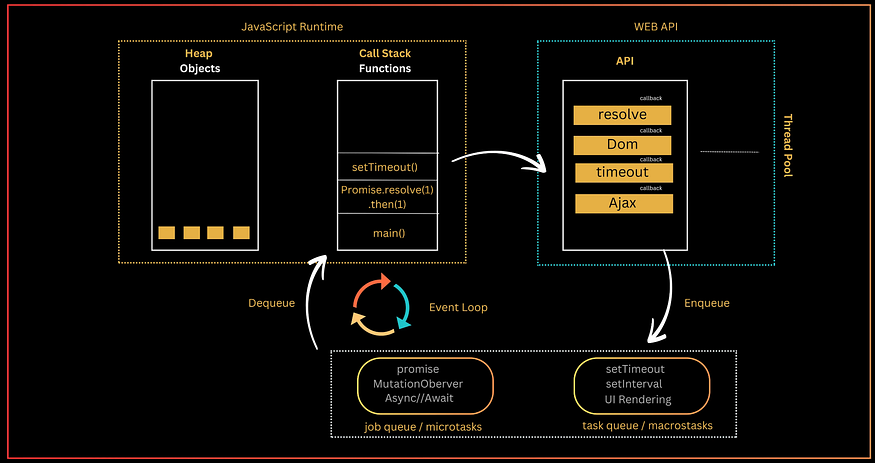
The Event loop is a core component of the JavaScript runtime environment. It is responsible for scheduling and executing asynchronous tasks. The event loop works by continuously monitoring two queues: the call stack and the event queue.
The call stack is a stack(LIFO) data structure that stores the functions that are currently being executed (stores the execution context created during the code execution).
Web APIs is the place where the async operations (setTimeout, fetch requests, promises) with their callbacks are waiting to complete. It borrows the thread from the thread pool to complete the task in the background without blocking the main thread.
The job queue (or microtasks) is a FIFO (First In, First Out) structure that holds the callbacks of async/await, promises, process.nextTick() that are ready to be executed. For example, the resolve or reject callbacks of a fulfilled promise are enqueued in the job queue.
The task queue (or macrostasks) is a FIFO (First In, First Out) structure that holds the callbacks of async operations (timer like setInterval, setTimeout) that are ready to be executed. For example, the callback of a timed-out setTimeout() — ready to be executed — is enqueued in the task queue.
The Event loop permanently monitors whether the call stack is empty. If the call stack is empty, the event loop looks into the job queue or task queue and dequeues any callback ready to be executed into the call stack.
4. Difference between var, let, and const?
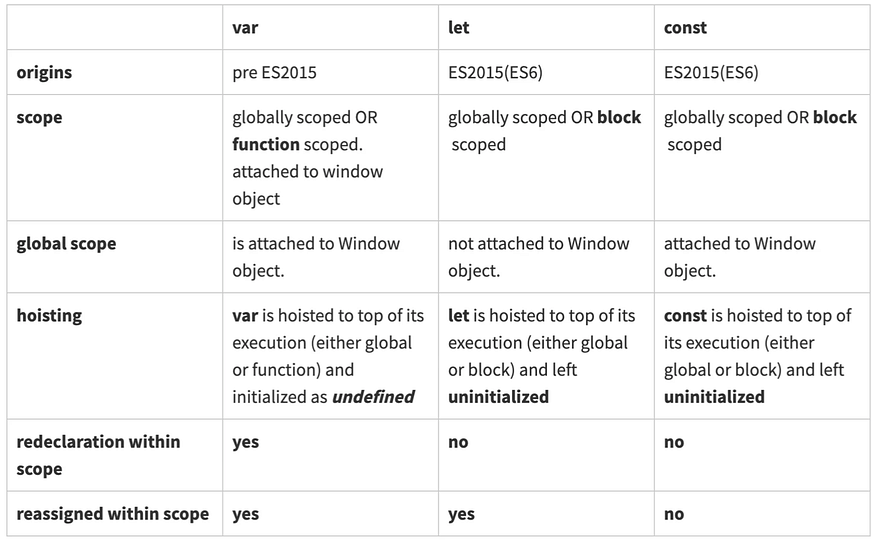
In a browser the window object is the window of the browser, the top structure in the HTML tree. Variables declared with var globally are attached to the window object. Type var dog = ‘bowser’ in the browser’s console and then type window.dog. The value ‘bowser’ appears! This makes controlling the scope of the variable even more difficult. By contrast, let and const are not attached to the window object.
5. Different data types in Javascript?
JavaScript is a dynamic and loosely typed, or duck-typed language. It means that we do not need to specify the type of variable because the JavaScript engine dynamically determines the data type of a variable based on its values.
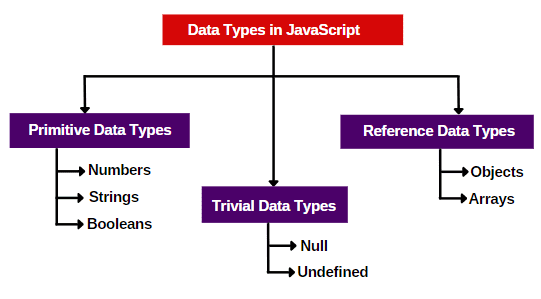
Primitive data types in JavaScript are the most basic data types that represent single values. They are immutable (cannot be changed) and directly hold a specific value.
In JavaScript, a Symbol is a primitive data type introduced in ECMAScript 6 (ES6) that represents a unique and immutable value. It is often used as an identifier for object properties to avoid name collisions
const mySymbol = Symbol('key');
   const obj = {
       [mySymbol]: 'value'
   };
When a Symbol is used as a property key, it doesn’t clash with other property keys, including string keys.
6. What is callback function and callback hell ?
In JavaScript, callbacks are commonly used to handle asynchronous operations.
Callback function is a function that is passed as an argument to another function and is intended to be executed after the completion of a specific task or at a given time.
function fetchData(url, callback) {
  // Simulate fetching data from a server
  setTimeout(() => {
    const data = 'Some data from the server';
    callback(data);
  }, 1000);
}

function processData(data) {
  console.log('Processing data:', data);
}

fetchData('https://example.com/data', processData);
In this example, the fetchData function takes a URL and a callback function as arguments. After fetching the data from the server (simulated using setTimeout), it calls the callback function and passes the retrieved data to it.
Callback Hell, also known as “Pyramid of Doom” is a term used in JavaScript programming to describe a situation where multiple nested callbacks are used within asynchronous functions.
“It occurs when asynchronous operations depend on the results of previous asynchronous operations, resulting in deeply nested and often hard-to-read code.”
Callback Hell is an anti-pattern with multiple nested callbacks which makes code hard to read and debug when dealing with asynchronous logic.
fs.readFile('file1.txt', 'utf8', function (err, data) {
  if (err) {
    console.error(err);
  } else {
    fs.readFile('file2.txt', 'utf8', function (err, data) {
      if (err) {
        console.error(err);
      } else {
        fs.readFile('file3.txt', 'utf8', function (err, data) {
          if (err) {
            console.error(err);
          } else {
            // Continue with more nested callbacks...
          }
        });
      }
    });
  }
});
In this example, we’re reading three files sequentially using the fs.readFile function, and each file reading operation is asynchronous. As a result, we have to nest the callbacks inside one another, creating a pyramid structure of callbacks.
To avoid Callback Hell, modern JavaScript provides alternatives like Promises and async/await. Here’s the same code using Promises:
const readFile = (file) => {
  return new Promise((resolve, reject) => {
    fs.readFile(file, 'utf8', (err, data) => {
      if (err) {
        reject(err);
      } else {
        resolve(data);
      }
    });
  });
};
readFile('file1.txt')
.then((data1) => {
return readFile('file2.txt');
})
.then((data2) => {
return readFile('file3.txt');
})
.then((data3) => {
// Continue with more promise-based code...
})
.catch((err) => {
console.error(err);
});7. What is Promise and Promise chaining?
Promise: A Promise is an object in JavaScript used for asynchronous computations. It represents the result of an asynchronous operation, the result may be resolved or rejected.
Promises have three states:
- Pending: The initial state. This is the state in which the Promise’s eventual value is not yet available.
- Fulfilled: The state in which the Promise has been resolved successfully, and the eventual value is now available.
- Rejected: The state in which the Promise has encountered an error or has been rejected, and the eventual value cannot be provided.
Promise constructor has two parameters (resolve, reject) which are functions. If the async task has been completed without errors then call the resolve function with message or fetched data to resolve the promise.
If an error occurred then call the reject function and pass the error to it.
we can access the result of promise using .then() handler.
we can catch the error in the .catch() handler.
// Creating a Promise
const fetchData = new Promise((resolve, reject) => {
  // Simulate fetching data from a server
  setTimeout(() => {
    const data = 'Some data from the server';
    // Resolve the Promise with the retrieved data
    resolve(data);
    // Reject the Promise with an error
    // reject(new Error('Failed to fetch data'));
  }, 1000);
});

// Consuming the Promise
fetchData
  .then((data) => {
    console.log('Data fetched:', data);
  })
  .catch((error) => {
    console.error('Error fetching data:', error);
  });
Promise chaining: The process of executing a sequence of asynchronous tasks one after another using promises is known as Promise chaining.
It involves chaining multiple .then() methods to a Promise to perform a series of tasks in a specific order.
new Promise(function (resolve, reject) {
  setTimeout(() => resolve(1), 1000);
})
  .then(function (result) {
    console.log(result); // 1
    return result * 2;
  })
  .then(function (result) {
    console.log(result); // 2
    return result * 3;
  })
  .then(function (result) {
    console.log(result); // 6
    return result * 4;
  });
8. What is async/await ?
Async/await is a modern approach to handling asynchronous code in JavaScript. It provides a more concise and readable way to work with Promises and async operations, effectively avoiding the “Callback Hell” and improving the overall structure of asynchronous code.
In JavaScript, the async keyword is used to define an asynchronous function, which returns a Promise.
Within an async function, the await keyword is used to pause the execution of the function until a Promise is resolved, effectively allowing for synchronous-looking code while working with asynchronous operations.
async function fetchData() {
  try {
    const data = await fetch('https://example.com/data');
    const jsonData = await data.json();
    return jsonData;
  } catch (error) {
    throw error;
  }
}

// Using the async function
fetchData()
  .then((jsonData) => {
    // Handle the retrieved data
  })
  .catch((error) => {
    // Handle errors
  });
In this example, the fetchData function is defined as an async function, and it uses the await keyword to pause the execution and wait for the fetch and json operations, effectively working with Promises in a way that resembles synchronous code.
9. What is the difference between == and === operators ?
== (Loose Equality Operator): This operator performs type coercion, which means it converts the operands to the same type before making the comparison. It checks if the values are equal without considering their data types. For example, 1 == '1' will return true because JavaScript converts the string '1' to a number before comparison.
=== (Strict Equality Operator): This operator performs a strict comparison without type coercion. It checks if both the values and their data types are equal. For example, 1 === '1' will return false because the data types are different (number and string).
In summary, == checks for equality after type coercion, whereas === checks for strict equality, considering both the values and their data types.
Execution of == will be fast as compared to the === statement.
Some of the example that covers the above cases:
0 == false   // true
0 === false  // false
1 == "1"     // true
1 === "1"    // false
null == undefined // true
null === undefined // false
'0' == false // true
'0' === false // false
[]==[] or []===[] //false, refer different objects in memory
{}=={} or {}==={} //false, refer different objects in memory
10. Different ways to create an Object in Javascript ?
In JavaScript, there are several ways to create objects. Some common methods for object creation include:
a)Object Literals: The most straightforward way to create an object is by using object literals, which define an object’s properties and methods in a comma-separated list enclosed in curly braces.
   let person = {
       firstName: 'John',
       lastName: 'Doe',
       greet: function() {
           return 'Hello, ' + this.firstName + ' ' + this.lastName;
       }
   };
b)Constructor Function: Constructor functions can be used to create multiple instances of an object with the new keyword. Inside the constructor function, properties and methods can be assigned to the this keyword.
   function Person(firstName, lastName) {
       this.firstName = firstName;
       this.lastName = lastName;
       this.greet = function() {
           return 'Hello, ' + this.firstName + ' ' + this.lastName;
       };
   }

   let person1 = new Person('John', 'Doe');
let person2 = new Person('Jane', 'Smith');c)Object.create(): The Object.create() method allows you to create a new object with a specified prototype object. This method provides more control over the prototype of the newly created object.
   let personProto = {
       greet: function() {
           return 'Hello, ' + this.firstName + ' ' + this.lastName;
       }
   };

   let person = Object.create(personProto);
   person.firstName = 'John';
   person.lastName = 'Doe';
d)Class Syntax (ES6): With the introduction of ES6, JavaScript supports class syntax for defining objects using the class keyword. This provides a more familiar and structured way to create objects and define their properties and methods.
   class Person {
       constructor(firstName, lastName) {
           this.firstName = firstName;
           this.lastName = lastName;
       }
       greet() {
           return 'Hello, ' + this.firstName + ' ' + this.lastName;
       }
   }

   let person = new Person('John', 'Doe');
e)Factory Functions: Factory functions are functions that return an object. This approach allows you to encapsulate the object creation process and easily create multiple instances with custom properties.
   function createPerson(firstName, lastName) {
       return {
           firstName: firstName,
           lastName: lastName,
           greet: function() {
               return 'Hello, ' + this.firstName + ' ' + this.lastName;
           }
       };
   }

   let person1 = createPerson('John', 'Doe');
let person2 = createPerson('Jane', 'Smith');f)Object.setPrototypeOf(): The Object.setPrototypeOf() method can be used to set the prototype of a specified object. This offers an alternative approach to setting the prototype of an object after its creation.
   let personProto = {
       greet: function() {
           return 'Hello, ' + this.firstName + ' ' + this.lastName;
       }
   };

   let person = {};
   person.firstName = 'John';
   person.lastName = 'Doe';
Object.setPrototypeOf(person, personProto);g)Object.assign(): The Object.assign() method can be used to create a new object by copying the values of all enumerable own properties from one or more source objects to a target object. This is particularly useful for merging objects or creating a shallow copy.
   let target = { a: 1, b: 2 };
   let source = { b: 3, c: 4 };
   let mergedObject = Object.assign({}, target, source);
h)Prototype Inheritance: JavaScript uses prototypal inheritance, allowing objects to inherit properties and methods from other objects. You can create objects by leveraging prototypal inheritance and using the prototype property of constructor functions or classes to define shared behavior.
   function Animal(name) {
       this.name = name;
   }

   Animal.prototype.greet = function() {
       return 'Hello, I am ' + this.name;
   };

   function Dog(name, breed) {
       Animal.call(this, name);
       this.breed = breed;
   }

   Dog.prototype = Object.create(Animal.prototype);
   Dog.prototype.constructor = Dog;

   let myDog = new Dog('Max', 'Poodle');
i)Singleton Pattern: The singleton pattern is used to restrict an object to a single instance. It can be implemented in JavaScript using a combination of closures and immediately invoked function expressions (IIFE). This ensures that only one instance of the object is created.
   let singleton = (() => {
       let instance;

       function createInstance() {
           return {
               // properties and methods
           };
       }

       return {
           getInstance: () => {
               if (!instance) {
                   instance = createInstance();
               }
               return instance;
           }
       };
   })();
11. What is rest and spread operator?
The rest operator, represented by three dots (...), is used in function parameters to collect a variable number of arguments into an array. It allows you to pass an arbitrary number of arguments to a function without explicitly defining them as named parameters.
function sum(...numbers) {
    return numbers.reduce((total, num) => total + num, 0);
}
console.log(sum(1, 2, 3, 4)); // Outputs 10
The spread operator, also denoted by three dots (...), is used to spread the elements of an array or object into another array or object. It allows you to easily clone arrays, concatenate arrays, and merge objects.
const array1 = [1, 2, 3];
const array2 = [4, 5, 6];
const mergedArray = [...array1, ...array2];
// mergedArray is [1, 2, 3, 4, 5, 6]
const obj1 = { a: 1, b: 2 };
const obj2 = { b: 3, c: 4 };
const mergedObject = { ...obj1, ...obj2 };
// mergedObject is { a: 1, b: 3, c: 4 }12. What is a higher-order function?
Higher-order function in JavaScript is a function that either takes one or more functions as arguments or returns a function as its result. In other words, it operates on functions, either by taking them as arguments, returning them, or both.
function operationOnArray(arr, operation) {
  let result = [];
  for (let element of arr) {
    result.push(operation(element));
  }
  return result;
}

function double(x) {
  return x * 2;
}

let numbers = [1, 2, 3, 4];
let doubledNumbers = operationOnArray(numbers, double);
console.log(doubledNumbers); // Output: [2, 4, 6, 8]
They enable powerful techniques such as function composition, currying, and callback-based asynchronous operations. Understanding higher-order functions is essential for writing expressive and functional-style JavaScript code.
An unary function (i.e. monadic) is a function that accepts exactly one argument. It stands for a single argument accepted by a function.
13. What is Closure? What are the use cases of Closures?
Closure is a feature that allows the function to capture the environment (or to retain access to variables from the scope ) where it is defined, even after that scope has closed.
We can say the closure is a combination of a function and lexical environment where that function is defined.
In other words, a closure gives a function access to its own scope, the scope of its outer function, and the global scope, allowing it to “remember” and continue to access variables and parameters from these scopes.
function outerFunction() {
  let outerVariable = 'I am from the outer function';

  return innerFunction() {
    console.log(outerVariable); // Accessing outerVariable from the outer function's scope
  }

}

let myFunction = outerFunction();
myFunction(); // Output: I am from the outer function
Closure is created every time when a function is created at the time of function creation and when you define a function inside another function.
Execution context is an environment where JavaScript code is executed. For each function call a separate execution context is created and pushed into the execution stack. Once function execution completed it is popped off from stack.
Every execution context has a space in memory where its variables and function are stored, and once the function popped off from the execution stack a JavaScript Garbage collector clear all of these things.
In JavaScript, anything is garbage-collected only when there are no references to it.
In the above example, the anonymous execution context still has a reference to the variables to the memory space of its outer environment. Even though the outerFunction() is finished. (It can access the outerVariable variable and use it inside console.log(outerVariable)).
Closures have several important use cases in JavaScript:
- Data Privacy and Encapsulation: Closures can be used to create private data and encapsulate functionality within a limited scope. By defining functions within another function, the inner functions have access to the outer function’s variables, but these variables are inaccessible from outside the outer function. This allows for the creation of private data and methods that are not directly accessible from the outside, thereby enhancing data privacy and encapsulation.
- Maintaining State: Closures are often used to maintain state in asynchronous operations and event handling. For example, when handling asynchronous tasks, closures can capture and retain the state of variables across multiple asynchronous operations, ensuring that the correct variables are accessed when the asynchronous tasks complete.
- Currying and Partial Application: Closures facilitate functional programming techniques such as currying and partial application. By using closures to capture and remember specific parameters and return a new function that uses these captured parameters, currying and partial application can be achieved. This allows for the creation of specialized functions with pre-set arguments, providing flexibility and reusability.
- Module Pattern: Closures are essential in implementing the module pattern in JavaScript. By using closures to create private variables and expose only the necessary public methods, developers can create modular and organized code, preventing unwanted access and modification of internal module data.
- Callback Functions: Closures are often employed when working with callback functions. A closure can be used to capture and maintain the state of variables within the context of an asynchronous operation, ensuring that the correct variables are accessible when the callback function is invoked.
14. Explain the concept of hoisting in JavaScript.
Hoisting in JavaScript is the default behavior where variable and function declarations are moved to the top of their containing scope during the compilation phase, before the actual code execution. This means that you can use a variable or call a function before it’s declared in your code.
When you declare a variable using var, the declaration is hoisted to the top of its containing function or block and initialized with the default value of “undefined”.
console.log(x); // Outputs: undefined
var x = 5;
Variables declared with let and const are hoisted as well but have a "temporal dead zone" where they cannot be accessed before their declaration.
console.log(x); // Throws an error (ReferenceError)
let x = 5;
Function declarations are also hoisted to the top of their containing scope. You can call a function before it’s declared in your code.
sayHello(); // Outputs: "Hello, world!"
function sayHello() {
    console.log("Hello, world!");
}
Hoisting is not happening with an arrow function, function expression, or variable initialization.
15. What is a Temporal dead zone?
The Temporal Dead Zone (TDZ) is a concept in JavaScript related to variable declarations using let and const.
When you declare a variable with let or const, it is hoisted to the top of its containing scope, However, unlike var, variables declared with let and const remain uninitialized in the TDZ.
Any attempt to access or use the variable before its actual declaration within the scope will result in a ReferenceError. This is to prevent the use of variables before they have been properly defined.
Understanding the Temporal Dead Zone is important because it helps prevent bugs related to variable usage before initialization. It also promotes best practices in JavaScript coding by encouraging proper variable declarations before use.
16. What is a prototype chain? and Object.create() method?
In JavaScript, every function and object has a property named prototype by default.
Every object in JavaScript has a prototype. A prototype is another object from which the current object inherits properties and methods. You can think of the prototype as a template or a parent object.
The prototype chain is a mechanism that allows objects to inherit properties and methods from other objects
When you access a property or method on an object, JavaScript first looks for it on the object itself. If it doesn’t find it, it looks up the prototype chain until it finds the property or method. This process continues until it reaches the Object.prototype at the top of the chain.