
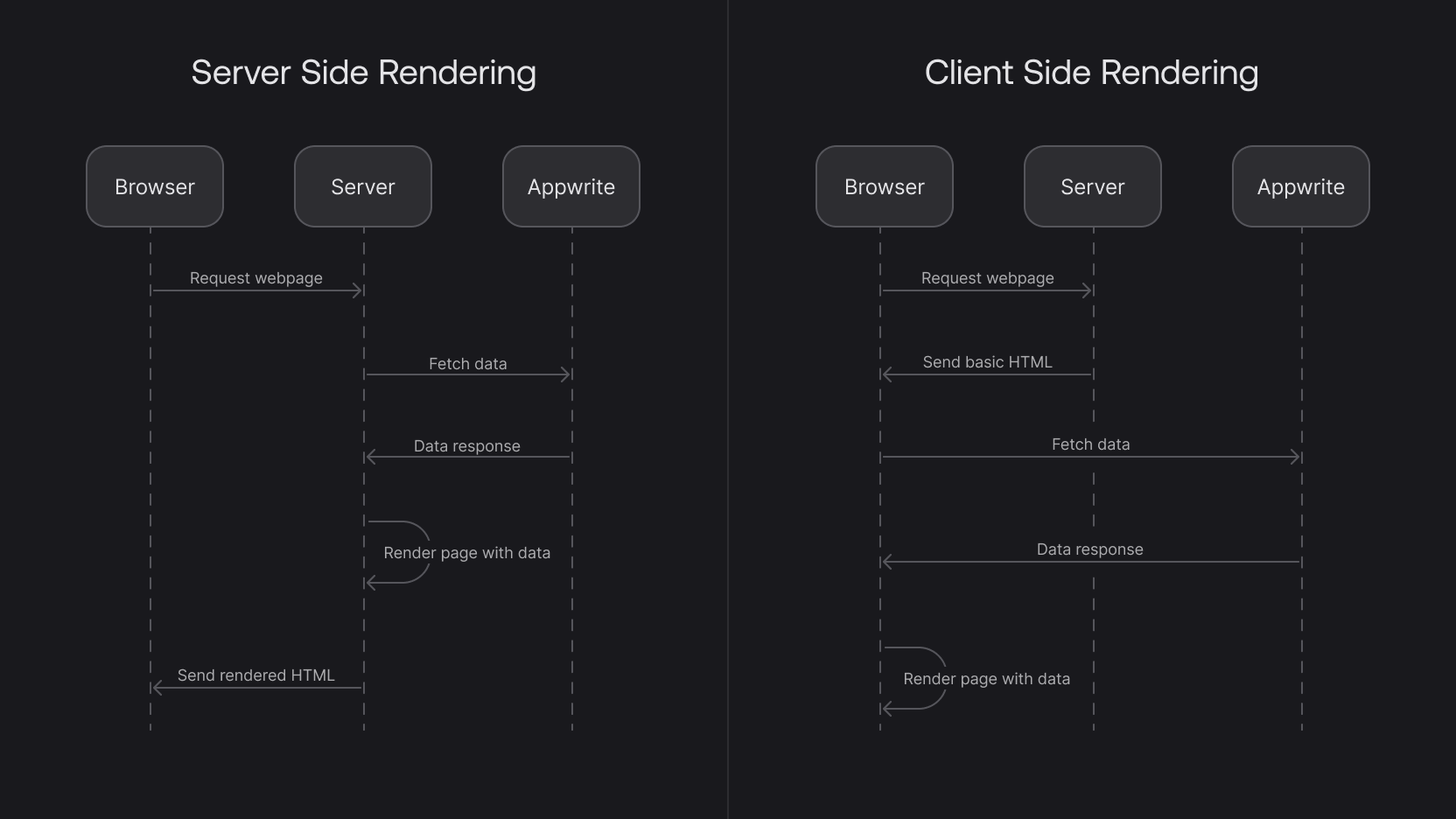
SSR vs CSR: Breaking Down the Rendering Process
When building modern web applications, one of the critical decisions you'll make is choosing between Server-Side Rendering (SSR) and Client-Side Rendering (CSR). Each has its strengths and weaknesses, and understanding how they work can help you optimize performance and user experience.
Let’s break down the rendering processes and discuss the pros and cons of each.
How SSR Works
- Request to Server: When a user sends an HTTP request, the server processes the request and generates the necessary HTML.
- Server Processing: All the heavy lifting, like fetching data and processing code, is done on the server.
- Sending HTML: The server sends a fully-formed HTML page to the browser.
- Rendering: Since the HTML is already rendered, the browser can display the page quickly.
While SSR seems straightforward, things get more complex when interactive JavaScript components need to be handled on the client side. We’ll get into that shortly, but let’s first see how CSR works.
How CSR Works
- Request to Server: An HTTP request is made, and the server responds with an empty HTML file and JavaScript bundles.
- Client Processing: The client (browser) takes over and processes all the JavaScript.
- DOM Manipulation: JavaScript dynamically builds the HTML and modifies the DOM to create the final page for the user.
In simplified terms, CSR renders the content in the browser using JavaScript instead of doing it on the server. This approach affects performance and user experience in different ways than SSR.
Advantages and Disadvantages of SSR
Benefits of SSR:
- Faster Initial Load: Since the server sends fully rendered HTML, the browser can display content quickly, improving load times—an essential factor for both user experience and SEO.
- SEO-Friendly: Search engines like Google can easily index the pre-rendered HTML, making SSR an excellent choice for SEO.
Drawbacks of SSR:
- Less Interactivity: Pages rendered purely on the server are static and lack interactivity, which users expect from modern web apps.
- Complexity with Hydration: To add interactivity, JavaScript needs to be sent after the HTML, a process known as hydration. This introduces complexity, as splitting and loading code efficiently can be challenging.
Advantages and Disadvantages of CSR
Benefits of CSR:
- Highly Interactive Pages: Since the client handles all the rendering and JavaScript, you have more flexibility in building dynamic, interactive UIs.
- Better User Experience: Once the page is loaded, subsequent interactions can feel faster because there’s no need for full-page reloads.
Drawbacks of CSR:
- Slower Initial Load: The initial load can be slower because the browser has to download and execute JavaScript before rendering the content.
- SEO Issues: Search engines can struggle to index pages that rely on client-side rendering, especially if they can’t access the JavaScript-rendered content.
SSR vs. CSR: When to Use Which?
Choosing between SSR and CSR depends on the specific needs of your application:
SSR is great for content-heavy websites where the initial page load speed and SEO are priorities. It also helps when dealing with dynamic data that changes frequently because the server can pre-fetch and pre-render content before sending it to the browser.
CSR, on the other hand, is ideal for interactive applications where user experience relies heavily on dynamic components. CSR works well in scenarios where performance after the initial load is crucial, like single-page applications (SPAs).
The Hybrid Approach: Code Splitting and Hydration
Most modern frameworks, like Next.js, offer a hybrid approach by combining the best of both SSR and CSR. With code splitting and hydration, you can pre-render content on the server for fast initial load times and then send small JavaScript bundles to make the page interactive. This way, you maintain the benefits of SSR while avoiding some of its limitations.
How to Leverage SSR Efficiently
If you’re planning to implement SSR in your project, don’t reinvent the wheel—leverage popular frameworks like Next.js or Nuxt.js that provide built-in support for SSR. They offer features like code-splitting, SEO optimizations, and hydration, allowing you to balance performance and interactivity.
However, be mindful of data fetching. Heavy data loads can slow down the SSR process and increase hosting costs. A common practice is to share the data-fetching workload between the client and the server to improve performance without overloading your resources.
Conclusion
Both SSR and CSR have their place in web development, and the best approach often depends on the project at hand. SSR shines when speed and SEO are critical, while CSR excels in creating highly interactive, dynamic user experiences.
By understanding the strengths and weaknesses of each, and using frameworks like Next.js, you can optimize your web applications for performance, SEO, and user engagement.
#WebDevelopment #SSR #CSR #FrontendDevelopment #SEO #JavaScript #NextJS #React #PerformanceOptimization